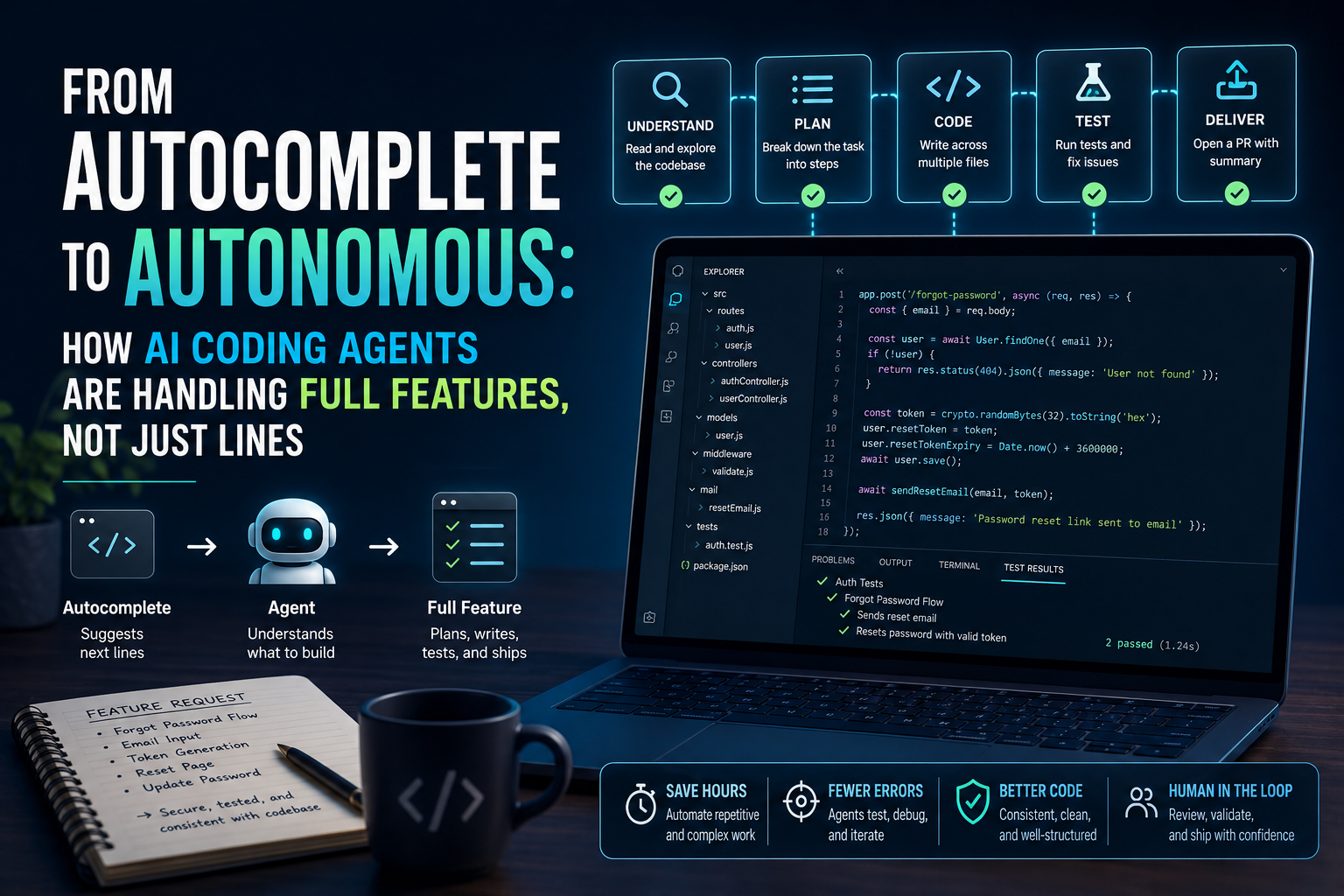
If you learned to code (or started using AI while coding) even two years ago, you probably remember AI as a glorified autocomplete it finished your for loop, guessed your variable name, maybe wrote a function if you were lucky. That world is gone. AI coding agents today can read a ticket, plan the work, write across multiple files, run tests, fix their own bugs, and open a pull request with a human checking in only at the start and the end.
Quick answer: AI coding agents have moved from single-line, single-file suggestions to autonomous, multi-step workflows that can plan, write, test, and debug entire features on their own. Tools like Claude Code, GitHub Copilot’s agent mode, and Cursor’s agent workflows now handle tasks that used to take a developer hours, though human review is still essential before anything ships to production.
I use these tools almost every day for client projects and my own side builds, so this isn’t a theoretical roundup. It’s what I’ve actually seen work, and where it still falls apart.
What “Autocomplete AI” Actually Meant
The first wave of AI coding tools think early GitHub Copilot around 2021-2022 worked on a simple principle: predict the next few tokens based on what you’d already typed.
That was genuinely useful. It saved keystrokes, reduced typos, and helped with boilerplate. But it had a ceiling:
- It only saw the file you had open, not your whole codebase.
- It had no memory of your project’s architecture or conventions.
- It couldn’t run anything no tests, no terminal, no verification.
- Every suggestion needed a human to accept, reject, or edit it line by line.
In short, it was a really smart typing assistant. You were still the one doing all the thinking, planning, and stitching things together.
What Changed: The Shift to Agentic Coding
The jump from “autocomplete” to “agent” happened because of three things coming together around the same time:
- Longer context windows models can now hold entire codebases (or large chunks of them) in memory, not just one open file.
- Tool use models can now call functions: read a file, edit a file, run a shell command, execute tests, search the web for a library’s documentation.
- Planning and iteration instead of one-shot answers, agents can break a task into steps, execute a step, check the result, and adjust much like a junior developer would.
This is the difference between “suggest the next line” and “here’s a feature request, go build it and tell me when it’s done.”
A Simple Way to Picture It
Think of the old model as a spell-checker sitting next to you as you type. Think of an agent as a junior developer sitting at their own desk, who you hand a Jira ticket to, and who comes back later with a working branch, a summary of what they changed, and questions if something was unclear.
How Full-Feature AI Coding Actually Works (Step-by-Step)
Here’s roughly what happens when I hand a real feature request to an agentic tool like Claude Code or an agent-mode IDE assistant:
- I describe the feature in plain language. For example: “Add a ‘forgot password’ flow email input, token generation, reset page, and update the user’s password in the database.”
- The agent explores the codebase first. It reads relevant files the auth module, the database schema, existing routes before writing anything. This step matters a lot; agents that skip it tend to produce code that doesn’t fit the existing patterns.
- It proposes a plan. Good agentic tools will outline the files they intend to touch and the approach, so you can catch a wrong assumption early instead of after 200 lines of code.
- It writes code across multiple files. Routes, database migration, email template, frontend form often in one pass, rather than one file at a time.
- It runs tests or writes new ones. If tests fail, a genuinely agentic tool will read the error, adjust the code, and re-run sometimes two or three cycles without me typing anything.
- It reports back. A summary of what changed, why, and any assumptions it made (like which email service it assumed you’re using).
I still review every single diff before merging. That part hasn’t changed, and honestly, it shouldn’t.
Real Tools Doing This Today
A few names you’ll likely run into if you’re exploring this space in India right now:
- Claude Code a command-line and IDE-integrated agent from Anthropic that can plan multi-file changes, run terminal commands, and iterate on its own output. It’s particularly strong at holding onto context across a longer coding session.
- GitHub Copilot (agent mode / workspace features) has expanded well beyond inline suggestions into task-based workflows where you describe a feature and it drafts a multi-file implementation.
- Cursor an AI-first code editor where “agent mode” can execute multi-step tasks, referencing your whole project rather than just the open tab.
Pricing and exact feature names on these tools change often, so if you’re picking one, it’s worth checking the current plans directly rather than trusting a review from six months ago mine included.
Where This Genuinely Helps (Real Use Cases)
- Boilerplate-heavy features CRUD APIs, auth flows, form validation where the pattern is well established and the agent has plenty of similar code to learn from.
- Refactoring across many files renaming a function used in 40 places, or migrating a project from one library to another.
- Writing tests for existing code agents are surprisingly good at reading a function and generating reasonable test cases you’d otherwise skip out of laziness.
- First drafts for prototypes if you’re a student or a small business owner who wants a working MVP fast, describing the feature and letting an agent build a rough version can save a genuine chunk of time.
Where It Still Falls Short
Being balanced here matters, because these tools are impressive but not magic.
- Business logic nuance. Agents can misunderstand domain-specific rules (like GST calculation quirks or region-specific compliance) unless you spell them out clearly.
- Silent wrong assumptions. An agent might quietly assume a database schema field that doesn’t exist, and unless you review carefully, that mistake ships.
- Security blind spots. Agents write functional code, not automatically secure code. Auth, payment, and data-handling features need a human security-minded review every time.
- Cost and token usage. Longer, multi-step agent sessions consume more compute than a quick autocomplete suggestion, and depending on your plan, that can add up.
- Overconfidence. These tools will often report “done” even when a test was skipped or an edge case was missed always verify, don’t just trust the summary.
None of this means don’t use them. It means treat the output the way you’d treat a capable but junior teammate’s work: review before you ship.
A Practical Prompting Habit That Helps
The single biggest improvement I’ve seen in my own results came from one habit: describe the feature like a ticket, not a wish.
Instead of “add login,” I write something like:
“Add email/password login using our existing
userstable (seemodels/user.js). Use bcrypt for hashing, JWT for the session token, and match the error-handling style used inroutes/signup.js.”
Giving the agent existing files to pattern-match against consistently produces better, more consistent code than a vague one-liner.
FAQ
Is AI coding going to replace developers in India? Not in the near term. It changes what developers spend time on more reviewing, architecture, and prompting; less typing boilerplate. Entry-level roles focused purely on repetitive coding tasks are the ones most likely to shift.
Do I need to know how to code to use these agentic tools? For simple prototypes, no you can describe what you want in plain English. But to catch mistakes, debug edge cases, or handle security-sensitive features, having at least basic coding knowledge helps a lot.
Which tool should a beginner in India start with? If you’re just experimenting, start with whichever tool has a free tier available for your current editor (many IDEs now have some free AI assistance built in), and only move to a paid plan once you know your workflow needs the extra capability.
Are these tools reliable enough for production code? They can produce production-quality code, but reliability depends entirely on your review process. Never merge agent-generated code for auth, payments, or data handling without a careful manual check.
Try This Next
Pick one small, well-defined feature in a personal or practice project something like a “contact form with email notification” and describe it to an AI coding agent the way you’d write a ticket for a colleague: mention the existing files to follow, the expected behavior, and any edge cases. Then review the output line by line before accepting anything. That one exercise will teach you more about what these tools can (and can’t) do than any review article, including this one.