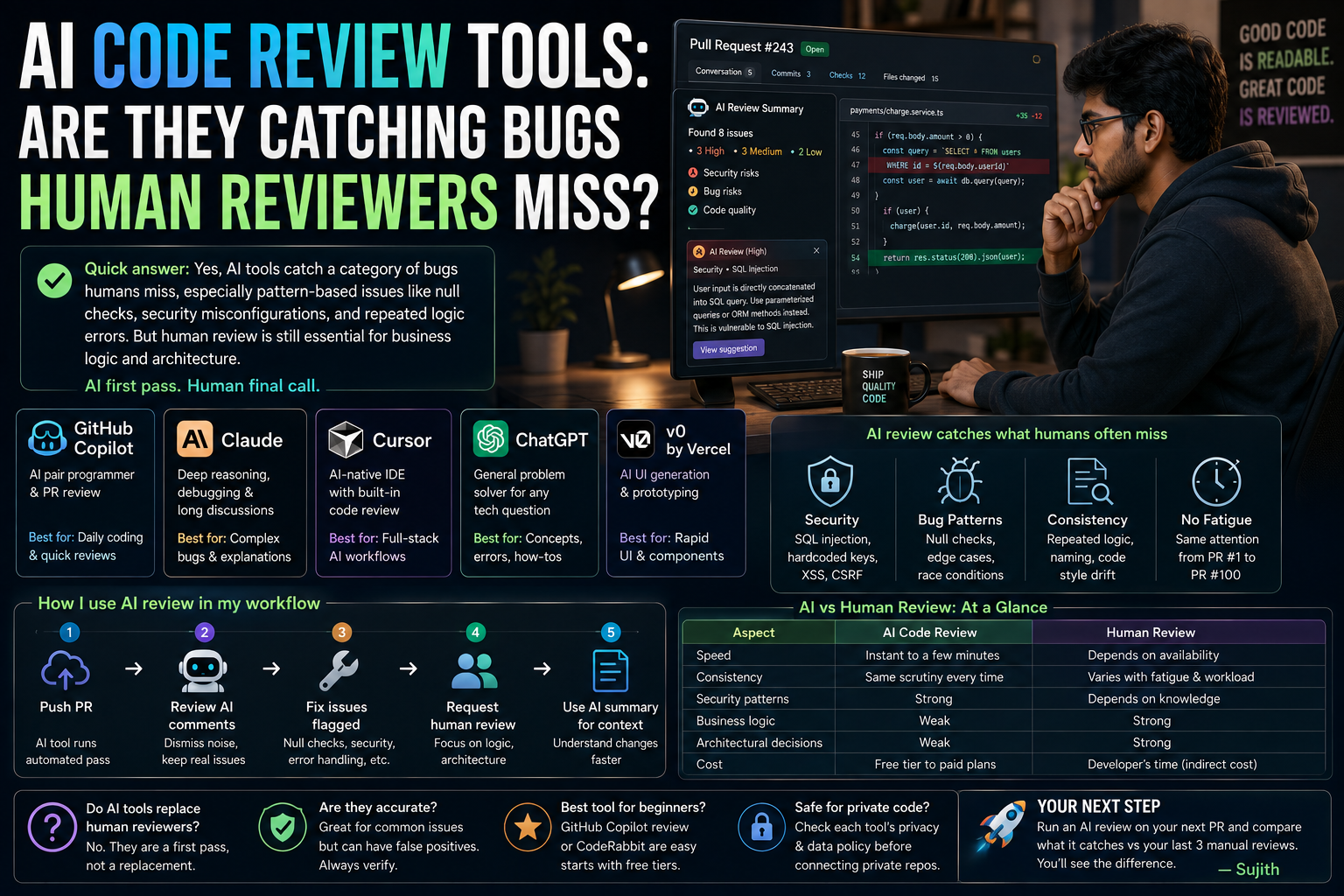
Quick answer: Yes, AI code review tools like GitHub Copilot, CodeRabbit, and Amazon CodeGuru genuinely catch a category of bugs that human reviewers routinely miss mostly pattern-based issues like null checks, security misconfigurations, and repeated logic errors buried in large diffs. But they still miss context-heavy problems that only a human who understands the business logic would spot. The real answer is that AI review works best as a first pass, not a replacement for your senior developer’s eyes.
I have been using a mix of AI review tools alongside manual pull request reviews for close to two years now, across a small SaaS project and a couple of freelance client codebases. So this isn’t theory this is what actually happens when you plug these tools into a real workflow.
What Exactly Is an AI Code Review Tool?
An AI code review tool is software that automatically scans your code usually at the pull request (PR) stage and flags potential bugs, security issues, style violations, or performance problems before a human even opens the diff.
Most of these tools work in one of two ways:
- Static analysis plus AI layer: Traditional linters and static analyzers (like ESLint or SonarQube) get an AI layer on top that explains issues in plain English and sometimes suggests fixes.
- LLM-based review: Tools built on large language models (like Claude or GPT-based models) read the entire diff, understand the surrounding code context, and leave comments the way a human reviewer would but instantly.
Popular examples Indian dev teams and freelancers actually use include GitHub Copilot’s PR review feature, CodeRabbit, Codacy, DeepSource, and Amazon CodeGuru Reviewer. Pricing on most of these ranges from a free tier for individual developers or open-source projects, up to per-seat monthly plans for teams though it’s worth checking current pricing pages directly since these change often.
Where AI Actually Catches What Humans Miss
1. Fatigue-Driven Blind Spots
Here’s something every developer knows but rarely admits: by the time you’re reviewing your fifth PR of the day, your eyes start skimming instead of reading. I have personally approved a PR with an unhandled null case simply because I was reviewing it at 7 PM after a long day. An AI reviewer doesn’t get tired. It applies the same scrutiny to PR number one and PR number fifty.
2. Security Misconfigurations
This is where AI tools genuinely shine. Things like hardcoded API keys, missing input sanitization, or SQL injection risks are exactly the kind of pattern-matching problem large language models and static analyzers are built for. In one client project, CodeRabbit flagged a database query that was vulnerable to injection something that had passed two rounds of human review because everyone was focused on the feature logic, not the query construction.
3. Consistency Across a Large Diff
When a PR touches 15 files, a human reviewer’s attention naturally gravitates toward the “interesting” files. AI tools don’t play favorites. They will flag the same missing error handling in file 12 as they do in file 1.
4. Style and Convention Drift
Not bugs exactly, but AI review tools are excellent at catching when a new contributor doesn’t follow existing naming conventions or code structure small things that compound into messy codebases over time.
Where Human Reviewers Still Win
It would be dishonest to pretend AI review tools are strictly better. They are not.
Business Logic Understanding
An AI tool has no idea that your app’s refund policy shouldn’t apply to a specific subscription tier. A human reviewer who has sat in the product meetings knows this instantly. I’ve seen AI tools approve logic that was technically clean but functionally wrong for the actual business rule.
Architectural Judgment
Should this function live in this service, or does it belong in a shared utility layer? Is this the right abstraction for where the product is heading in six months? These are judgment calls rooted in long-term context that current AI tools simply aren’t designed to make.
False Positives and Noise
AI reviewers can be overly cautious. I’ve had tools flag perfectly safe code as a “potential vulnerability,” which if left unchecked, trains your team to start ignoring AI comments altogether a real risk called alert fatigue.
A Practical Walkthrough: How I Use AI Review in My Own Workflow
Here’s the exact process I follow on a typical PR, which you can copy for your own team or solo project:
- Push the PR and let the AI tool run its automated pass first (usually takes 1–3 minutes depending on diff size).
- Skim the AI comments and immediately dismiss anything that’s clearly a false positive or purely stylistic and irrelevant to your team’s conventions.
- Fix the legitimate flags usually null checks, missing error handling, or security warnings before requesting human review.
- Request human review only after the AI pass is clean, so your human reviewer’s time goes toward logic and architecture, not typo-level catches.
- Use the AI tool’s summary (most tools generate a plain-English PR summary) as a quick way to understand what changed if you’re reviewing someone else’s large PR.
This single change running AI review before human review instead of in parallel cut our average PR review time by a noticeable margin, simply because human reviewers weren’t wasting time on things a machine could catch in seconds.
A Simple Comparison Table
| Aspect | AI Code Review | Human Code Review |
|---|---|---|
| Speed | Instant to a few minutes | Depends on reviewer availability |
| Consistency | Same scrutiny every time | Varies with fatigue, mood, workload |
| Security patterns | Strong | Depends on reviewer’s security knowledge |
| Business logic | Weak | Strong |
| Architectural decisions | Weak | Strong |
| Cost | Free tier to paid per-seat plans | Developer’s time (indirect cost) |
Should Indian Startups and Freelancers Actually Use These Tools?
If you’re a solo developer, a small startup team, or a freelancer juggling multiple client codebases, AI code review tools are genuinely worth adopting most offer generous free tiers for individuals or small open-source repos, which makes the barrier to entry low.
For students learning to code, tools like GitHub Copilot’s review features are also a solid way to get instant feedback on your practice projects without waiting for a mentor’s time.
That said, don’t treat the AI’s approval as a green light to skip human review entirely, especially for anything touching payments, user data, or core business logic.
Frequently Asked Questions
Do AI code review tools replace human code reviewers? No. They’re best used as a first-pass filter that catches pattern-based bugs, security issues, and style inconsistencies, freeing up human reviewers to focus on business logic and architecture.
Are AI code review tools accurate? They’re generally reliable for common issues like null checks, security misconfigurations, and style violations, but they can produce false positives, so every flag still needs a quick human sanity check.
Which AI code review tool is best for beginners? Tools with generous free tiers and simple GitHub integration, such as GitHub Copilot’s review feature or CodeRabbit, are a good starting point since they require minimal setup.
Is it safe to use AI code review tools on private or client codebases? Most reputable tools offer enterprise or private repo plans with data handling policies, but always read the specific tool’s privacy and data retention policy before connecting a client’s private repository, since terms vary by provider and can change over time.
Your Next Step
If you haven’t tried this yet, pick one AI code review tool with a free tier GitHub Copilot’s review feature or CodeRabbit are easy starting points and run it on your next pull request before your human reviewer looks at it. Compare what it flags against what your last three human-only reviews caught. That one comparison will tell you more about where AI review fits into your workflow than any article can.
— Sujith