If you’re a developer in India right now, you’ve probably felt it the ground shifting under the job market. Recruiters are asking about AI tools in interviews. College seniors are shipping side projects in a weekend that used to take a month. And somewhere in a Slack channel, someone just posted “just ask Claude” as the answer to a bug that would’ve eaten your whole afternoon in 2022.
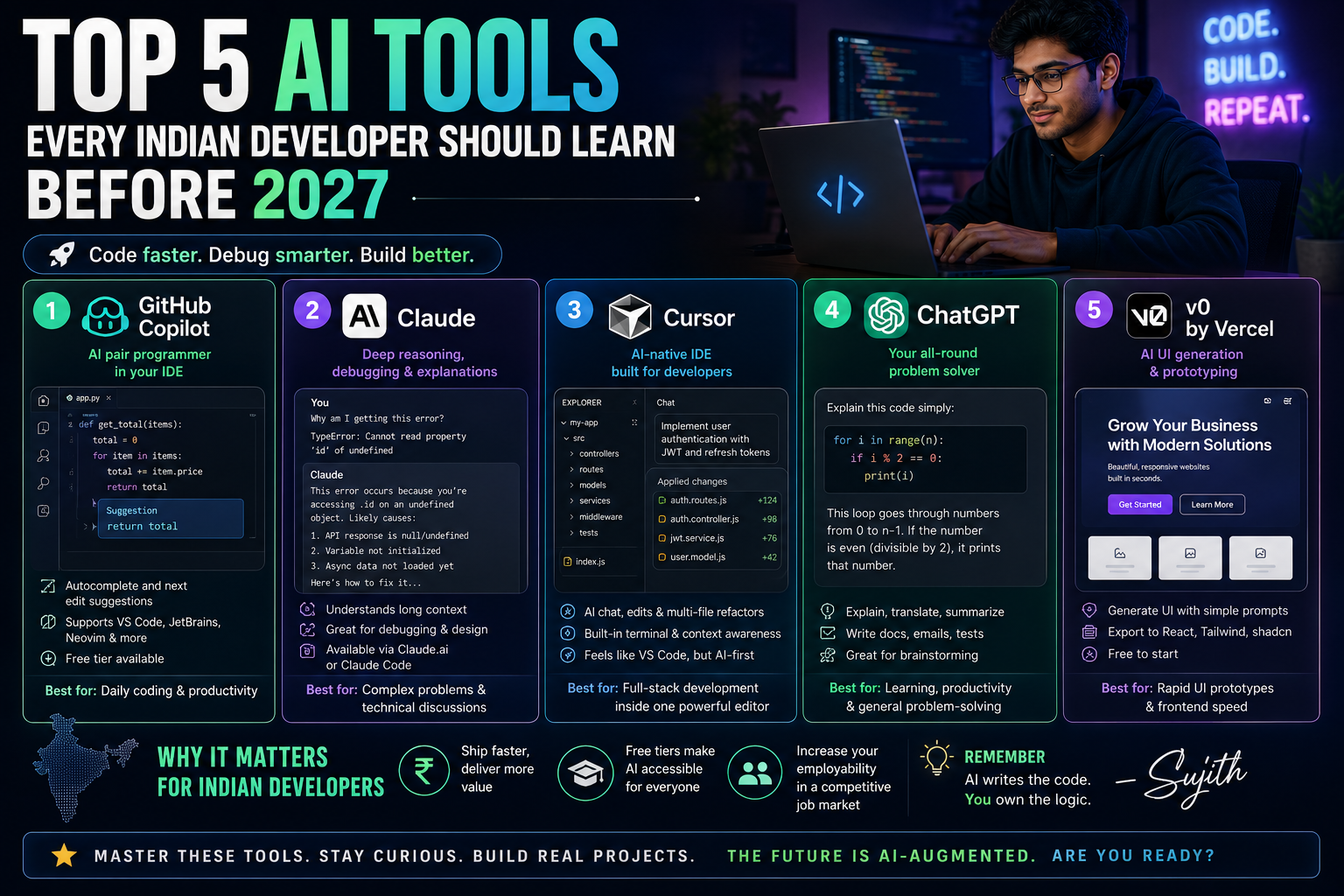
Quick answer: The five AI tools every Indian developer should get comfortable with before 2027 are GitHub Copilot, Claude (via claude.ai or Claude Code), Cursor, ChatGPT, and v0 by Vercel. Together they cover code completion, deep reasoning and debugging, full AI-native IDE workflows, general problem-solving, and rapid UI prototyping the core skill stack for modern software work.
I’m Sujith, and I use most of these tools daily some for client work, some for my own weekend builds. This isn’t a “best AI tools” listicle copied from a press release. It’s what I’d tell a junior developer sitting next to me at a coffee shop in Bangalore or Hyderabad, asking “where do I even start?”
Let’s get into it.
Why This Matters for Indian Developers Specifically
India has one of the largest developer populations in the world, and the competition for good roles especially remote and product-company jobs has only gotten sharper. A few things make AI tool fluency particularly important here:
- Many Indian companies are cost-conscious, so developers who can ship faster with AI assistance are genuinely more valuable to a small team or startup.
- Freelancers and students often can’t afford expensive courses, but most of these tools have usable free tiers.
- English-heavy documentation and Stack Overflow threads can be slow to search through AI tools compress that research time dramatically.
None of this means AI writes your code for you while you sip chai. It means the tools do the boring 60%, and you focus on the judgment-heavy 40% architecture, edge cases, and actually understanding what you shipped.
1. GitHub Copilot – The Daily Driver for Code Completion
GitHub Copilot is the AI pair programmer built into VS Code, JetBrains IDEs, and Neovim. It suggests code as you type, based on the context of your file and project.
Why it’s still worth learning
Copilot’s autocomplete and “Next Edit Suggestions” are genuinely free to use even on the no-cost tier, and they handle the repetitive stuff boilerplate functions, test scaffolding, converting a loop into a map function without you breaking flow.
How I actually use it
When I’m writing a Django REST API, I type a comment like # function to paginate queryset and return JSON response and let Copilot draft the function. I never accept blindly I read every suggestion, because Copilot occasionally hallucinates a library method that doesn’t exist, especially with less popular Python packages.
Pricing and limitations (subject to change)
Copilot has a free tier (limited monthly completions and premium requests), with paid individual plans historically around the $10–$39/month range, and separate business and enterprise seats. In 2026, GitHub shifted its billing model from a fixed “premium request” count to a usage-based credit system, where heavier use of premium models consumes more of your monthly credit allowance. Because pricing structures like this change fairly often, always check GitHub’s official plans page before assuming a number is current.
Limitation to know: Copilot is weaker at multi-file reasoning and large refactors compared to newer AI-native editors. It’s an autocomplete tool first, an agent second.
2. Claude – For Debugging, Reasoning, and Long Technical Conversations
Claude, made by Anthropic, is the model I reach for when a bug is confusing rather than just tedious. It’s also usable directly inside a terminal-based workflow through Claude Code, or through the regular chat interface.
Where Claude genuinely helps
- Pasting a long stack trace and asking “what’s actually going wrong here” instead of guessing
- Getting a second opinion on system design before you commit to an architecture
- Reviewing a pull request diff in plain English before you send it to your team lead
A real example
I once had a Node.js memory leak that took two days to chase manually. I described the symptom, pasted the relevant service code, and asked Claude to reason step-by-step about where references might not be getting garbage collected. It flagged an event listener that was never removed on component unmount that was the actual bug. It didn’t magically know my codebase; it just reasoned carefully through what I gave it.
Things to keep in mind
Claude has a free tier with usage limits, and paid tiers unlock higher limits and more capable models. Like any AI model, it can still get things wrong, especially with very recent library versions or niche frameworks, so treat its answers as a strong first draft, not gospel. Always test the code it gives you.
3. Cursor – An AI-Native Code Editor
Cursor is a fork of VS Code built from the ground up around AI. Instead of AI being a plugin bolted onto your editor, it’s woven into how you navigate, edit, and refactor code across your whole project.
Why it’s on this list
Cursor lets you reference multiple files in one prompt (“update this API call everywhere it’s used across the project”) and it can execute multi-step edits, not just single suggestions. For developers working on medium to large codebases, this project-wide context is the real upgrade over plain autocomplete tools.
A practical use-case
Migrating a React app from class components to functional components with hooks used to be a slow, error-prone manual job. With Cursor, I can point it at a directory, describe the migration pattern I want, and review each proposed change file-by-file before accepting.
Trade-offs
Cursor has a learning curve if you’re used to plain VS Code, and its free tier is more limited than its paid plans. It also depends on underlying AI models (including Claude and GPT-family models), so its quality and pricing shift as those underlying models change.
4. ChatGPT – The General-Purpose Problem Solver
ChatGPT, from OpenAI, remains the most widely used AI assistant among Indian developers and students, partly because it was the tool that introduced most people to conversational AI in the first place.
Where it fits into a developer’s workflow
- Explaining unfamiliar error messages or algorithms in plain language
- Drafting documentation, README files, and commit messages
- Acting as a rubber duck when you’re debugging alone at 2 a.m.
Realistic expectations
ChatGPT has a free tier with a lighter model and a paid subscription for more advanced reasoning models and higher usage limits. It’s excellent for general explanations but, like every large language model, it can be confidently wrong about very specific or very recent technical details. Cross-check anything critical especially security-related code before shipping it.
5. v0 by Vercel – Turning Prompts into Working UI
v0 is a tool that generates React and Tailwind CSS components from plain-English descriptions or design references. It’s aimed squarely at the “I know what I want it to look like, I just don’t want to write all the CSS” problem.
Why front-end-heavy Indian developers should try it
A huge number of freelance and agency projects in India are front-end and landing-page heavy. v0 can generate a working, responsive component say, a pricing table or a dashboard sidebar in minutes, which you then customize instead of building from a blank file.
How I use it in real projects
For client landing pages, I describe the section (“hero section with a headline, subheading, two CTA buttons, and a right-aligned illustration slot”) and get a working starting point. I still adjust spacing, brand colors, and accessibility details by hand v0 gets you to 70%, not 100%.
Limitation
Generated code can be verbose or use patterns that don’t perfectly match your existing codebase’s conventions, so budget time for cleanup, not just copy-paste.
How to Start Learning These Tools This Week
- Install GitHub Copilot’s free tier in VS Code and use it for one real coding session before judging it.
- Open Claude or ChatGPT and paste in a bug you’re currently stuck on describe what you expected versus what happened.
- Try Cursor on a small side project rather than your main work codebase first.
- Generate one UI component with v0 and manually rebuild it once by hand to understand what it actually produced.
- Keep a personal note of prompts that worked well for you this becomes your own prompt library over time.
A Word of Caution
None of these tools replace understanding fundamentals data structures, how HTTP actually works, how a database index behaves under load. If anything, AI tools raise the bar on fundamentals, because you now need to be able to judge whether the AI’s suggestion is actually correct. Treat 2026–2027 as the window to build both skills together: the AI tooling fluency and the underlying computer science that lets you catch it when it’s wrong.
Also remember that every price and feature mentioned above is accurate as of when this was written, but these tools update constantly new pricing tiers, new models, new limits. Always check the official page before you commit to a paid plan.
FAQ
Is it necessary to pay for all five tools? No. You can get meaningful value from the free tiers of GitHub Copilot, Claude, and ChatGPT to start. Upgrade selectively once you know which tool fits your daily workflow.
Will AI tools replace developer jobs in India? They’re changing what developers spend time on, shifting effort away from repetitive code-writing and toward review, architecture, and debugging judgment. Companies are increasingly looking for developers who can use these tools well, not developers who avoid them.
Which one tool should a beginner start with? Start with GitHub Copilot for coding practice and ChatGPT or Claude for explanations and debugging help. Add Cursor and v0 once you’re comfortable with basic AI-assisted coding.
Do these tools work well for regional-language documentation or comments? Most of these models handle English very well and are improving at other Indian languages, but for production code and technical documentation, English remains the more reliable choice for now.
Your Next Step
Don’t try to learn all five tools this weekend. Pick one bug you’re stuck on right now, open Claude or ChatGPT, and paste in the error message along with the relevant code. See how far a focused, well-described prompt actually gets you then compare that experience against how you’d normally have solved it. That single comparison will tell you more about where AI fits into your workflow than any listicle can.