If you use AI every day, you have probably experienced this: everything works perfectly for a while, and then suddenly the chatbot says you have reached a limit. The confusing part is that ChatGPT, Gemini, Claude and Perplexity do not measure “free usage” in exactly the same way.
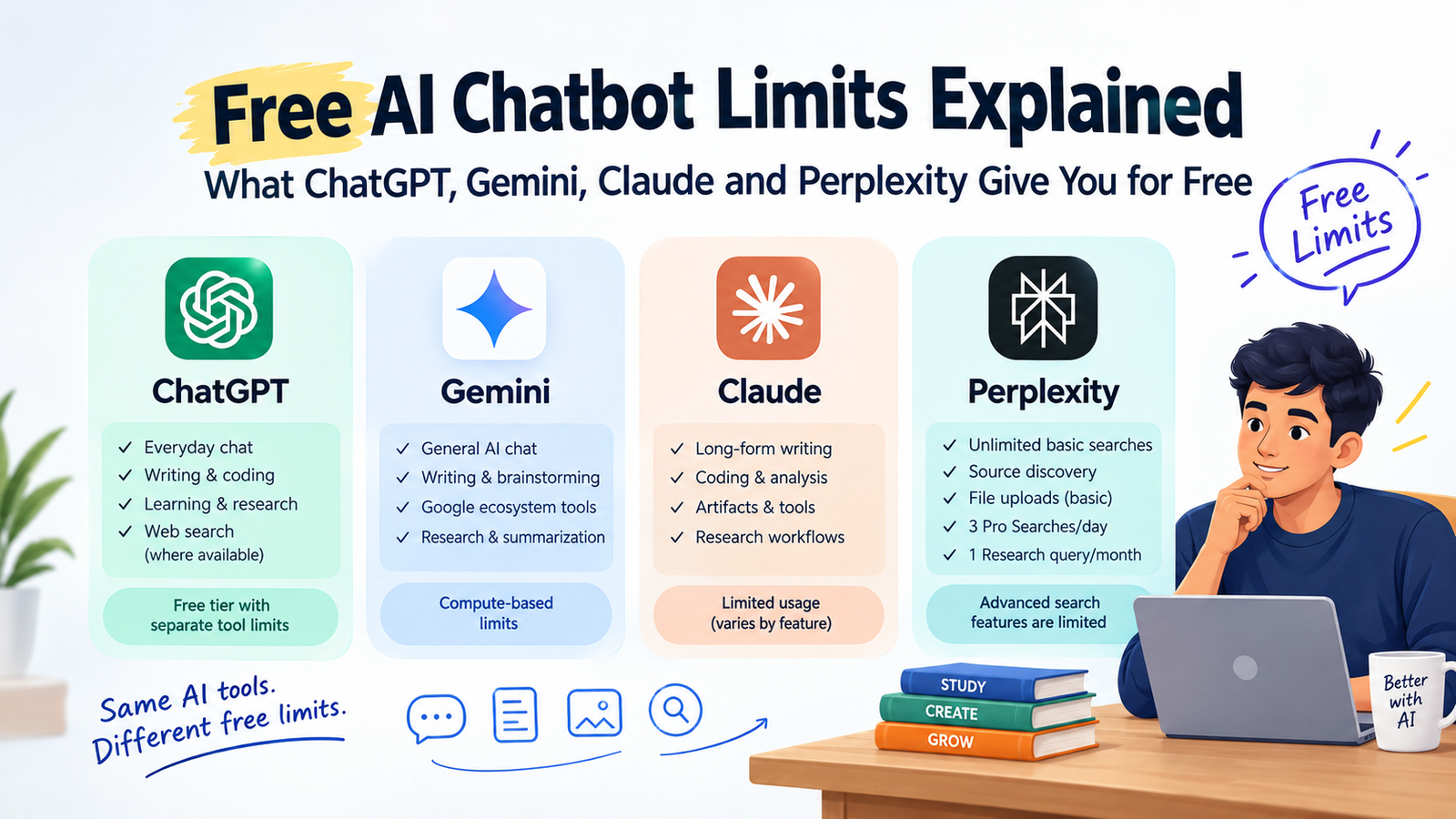
As of September 2026, ChatGPT Free provides broad access to everyday text conversations, while separate limits apply to tools such as file uploads, image generation, voice and data analysis. Gemini uses compute-based limits that can depend on the model, feature, prompt complexity and conversation length. Claude’s free plan has limited usage that can vary with message length, files, conversation length and tools, while Perplexity Free provides practically unlimited basic searches but only a small allowance for its more advanced searches.
For Indian students, marketers, developers, content creators and small-business owners, the important question is therefore not simply “Which chatbot is free?” It is what can I realistically accomplish before the free limits become a problem?
What Does “Free AI Chatbot Limit” Actually Mean?
An AI chatbot limit is a restriction placed on how much or how often you can use a particular model or feature without paying.
However, a limit does not always mean a simple number such as “20 messages per day.”
Modern AI services can measure usage using several factors:
- Number of messages
- Model being used
- Prompt complexity
- Length of the conversation
- Uploaded files
- Web searches
- Image generation
- Voice usage
- Deep research or agent features
- Computing resources required by the request
This is why two people can have very different experiences with the same free AI plan.
For example, asking:
“Give me 10 blog title ideas.”
is a relatively lightweight task.
Asking:
“Read this 100-page PDF, compare it with five websites, create a detailed report and generate supporting visuals.”
requires considerably more processing.
The second workflow can consume limits much faster.
ChatGPT Free Limits: What Can You Actually Do?
ChatGPT’s free experience has changed considerably over time, so older articles that quote a fixed number of messages may quickly become outdated.
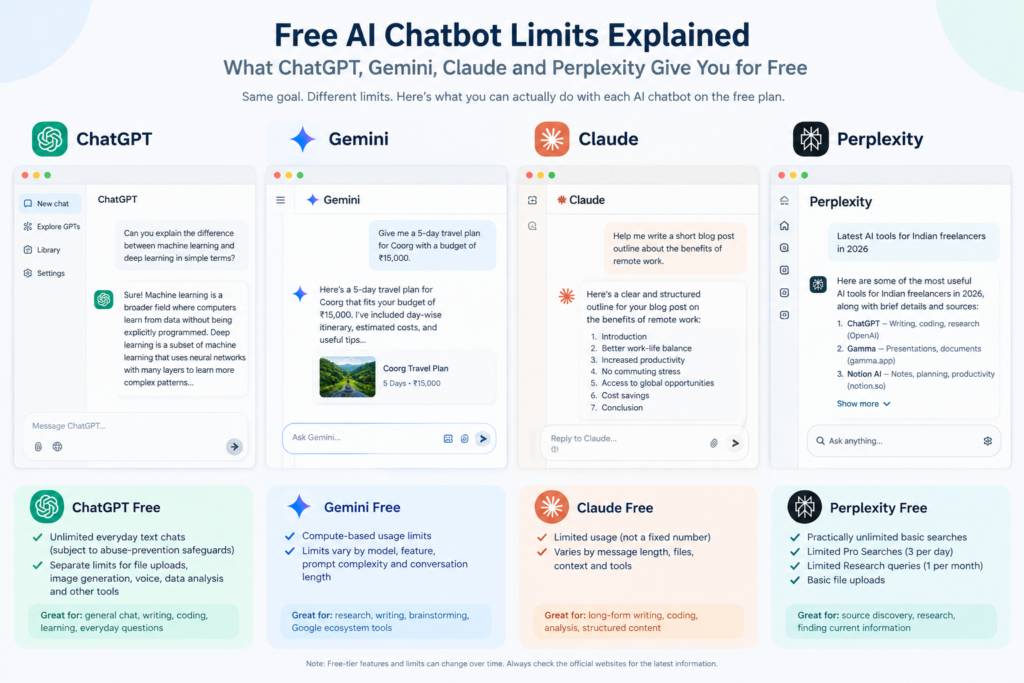
According to OpenAI’s current documentation, Free and Go users have unlimited everyday text chats subject to abuse-prevention safeguards, while separate usage limits continue to apply to features such as file uploads, image generation, voice and data analysis.
That distinction is important.
What ChatGPT Free is useful for
For a normal user, ChatGPT Free can be used for tasks such as:
- Writing and rewriting
- Brainstorming
- Learning concepts
- Programming assistance
- Summarizing information
- Creating outlines
- Translation
- General research
- Web search where available
- Everyday question answering
ChatGPT can also search the web and provide citations when current information is required.
Where the limits become noticeable
The restrictions become more important when you use resource-intensive features.
For example, you may be able to continue normal text conversations but encounter a separate limit when you:
- Upload multiple files.
- Generate many images.
- Use voice extensively.
- Perform data-analysis tasks.
- Use higher-level reasoning capabilities.
- Run other advanced tools.
OpenAI explicitly notes that different tools can have separate limits.
Practical example
Suppose you are a college student preparing for an exam.
You could use ChatGPT Free for:
Prompt 1: Explain the topic in simple English.
Prompt 2: Give me five examples.
Prompt 3: Create 20 practice questions.
Prompt 4: Check my answers.
That type of workflow is much less likely to run into a tool-specific restriction than repeatedly uploading large documents or generating images.
The lesson is simple: ChatGPT Free is not just about a message counter; the feature you use matters.
Gemini Free Limits: Why Google’s System Is Different
Gemini takes a more dynamic approach to usage limits.
Google says Gemini Apps use compute-based usage limits. The amount you can use depends on factors including prompt complexity, the model and features being used, and the length of the conversation. Limits can also change based on capacity and other conditions.
For users without a Google AI plan, Gemini currently provides a standard level of access.
Google also lists a 32K-token context window for users without an AI plan, compared with larger context windows on higher-tier plans.
Why context matters
Imagine you paste a long project specification into Gemini.
The chatbot doesn’t only have to generate an answer. It has to process the information you supplied and maintain relevant context while producing the response.
This is why a long technical conversation can consume resources differently from a short question.
Gemini is particularly useful for Google users
If your workflow already revolves around Google’s ecosystem, Gemini can be useful for:
- Studying
- Summarization
- Brainstorming
- Writing
- Research
- Working with long pieces of information
- Google-oriented productivity workflows
However, Google’s documentation warns that limits can change, including because of capacity constraints. Some resource-intensive features may also become unavailable to users without a paid plan during periods of high demand.
A useful Gemini strategy
Instead of sending ten tiny prompts:
“Give me a topic.”
“Now give me an introduction.”
“Now give me headings.”
“Now give me examples.”
Try one structured prompt:
“Create a beginner-friendly article outline about digital marketing for Indian college students. Include an introduction, 7 H2 sections, practical examples, common mistakes, FAQ questions and a conclusion.”
You can then refine the result.
This reduces unnecessary back-and-forth and usually produces a more coherent result.
Claude Free Limits: Why Your Message Length Matters
Claude’s free plan is designed for occasional use, while paid plans provide greater usage capacity. Anthropic currently describes the Free plan as having limited usage rather than promising one permanently fixed number of messages.
This is important because Claude’s usage is influenced by more than the number of messages you send.
Anthropic specifically lists factors such as:
- Message length
- File attachment size
- Current conversation length
- Tool usage
- Model choice
- Artifact creation and usage
Claude can be very useful for long-form work
Claude is particularly interesting for people working on:
- Long documents
- Coding
- Writing
- Analysis
- Structured content
- Artifacts
- Research workflows
Claude’s free experience also supports artifacts, which can turn AI-generated work into interactive or shareable creations.
The free-plan trap
One common mistake is assuming:
“I have not sent many messages, so I should have plenty of usage left.”
Not necessarily.
Consider two conversations.
Conversation A
10 short questions with short answers.
Conversation B
Three huge prompts containing long documents, extensive context and tool usage.
The second workflow can consume substantially more capacity.
Anthropic recommends batching related requests, providing clear instructions and avoiding unnecessary back-and-forth.
That is good advice for almost every AI chatbot.
Perplexity Free Limits: Different From the Other Three
Perplexity is slightly different because its core experience is centered around search and research, rather than being primarily a general-purpose chatbot.
As of September 2026, Perplexity’s Standard Free plan provides:
- Search history
- Practically unlimited basic searches
- A limited number of Pro Searches
- Basic file uploads
- Automatic model selection
However, advanced AI models and image generation are not included in the Free plan.
Perplexity currently lists 3 Pro Searches per day and 1 Research query per month for its Free plan.
This creates an interesting distinction.
You can perform lots of ordinary searches, but advanced research capabilities are much more restricted.
What is a Pro Search?
A normal search might be enough for:
“What is the current price of a particular laptop?”
A more complicated research task might involve:
“Compare five laptops for video editing, analyze their specifications, identify major differences and provide sources.”
The second type of workflow is more demanding.
Best use of Perplexity Free
For a student or content creator, a practical workflow could be:
- Use normal Perplexity searches to discover sources.
- Identify the most useful information.
- Reserve Pro Search for difficult research questions.
- Verify important claims against the original sources.
- Use ChatGPT, Gemini or Claude for writing and restructuring.
This makes the free allocation go further.
ChatGPT vs Gemini vs Claude vs Perplexity: Free Limits Compared
The following table summarizes the current free-tier approach rather than pretending that all four services use the same type of quota.
| AI Tool | Free Usage Model | What Free Users Can Do | Important Limitation |
|---|---|---|---|
| ChatGPT | Everyday chat plus separate tool limits | General chat, writing, coding, learning and other supported features | File, image, voice, data analysis and some advanced features have separate limits |
| Gemini | Compute-based limits | General AI conversations and supported Gemini features | Limits depend on complexity, model, feature and conversation length |
| Claude | Limited usage | Writing, coding, analysis, artifacts and supported tools | Usage varies with message length, files, context and tool usage |
| Perplexity | Basic searches are practically unlimited | Search, source discovery and basic file uploads | Advanced Pro Searches and Research are limited |
The key point is that there is no universal “best free AI chatbot” based purely on the number of messages.
Each platform allocates its free resources differently.
Which Free AI Chatbot Should You Use for Different Tasks?
Instead of choosing one chatbot for everything, think in terms of workflow.
For everyday questions
ChatGPT or Gemini can be practical choices.
You can ask questions, brainstorm ideas, learn concepts and refine writing without needing a complicated workflow.
For source-heavy research
Perplexity can be particularly useful because its product is built around search and source discovery.
However, important information should still be checked against the original source.
For long-form writing and structured documents
Claude can be useful for drafting and working through substantial text, while ChatGPT and Gemini can also handle many writing workflows.
The quality of the final result depends heavily on your prompt and the source material you provide.
For coding
You can use all three general-purpose assistants for coding-related tasks.
A practical approach is to give the AI:
- Your framework version
- The relevant code
- The error message
- Expected behavior
- What you already tried
For example:
“I am using Angular. Here is my component, service and exact console error. Identify the root cause first. Do not rewrite the entire project. Give me the smallest safe change and explain why it fixes the issue.”
This is much more useful than:
“My Angular code is not working. Fix it.”
How to Make Free AI Limits Last Longer
Here are practical techniques I use when working with AI tools.
1. Combine related requests
Instead of five separate prompts, create one well-structured request.
2. Give context once
Don’t repeatedly explain the same project in every message.
3. Avoid unnecessary giant prompts
More information isn’t automatically better.
Give the model the information it actually needs.
4. Save advanced searches for difficult questions
This is particularly useful with Perplexity’s limited Pro Search allocation.
5. Start a new conversation when the old one becomes unnecessarily large
Long conversations can consume more context and make it harder to keep the important information focused.
6. Don’t use expensive features for simple tasks
If you only need five title ideas, you probably don’t need a deep research workflow.
7. Verify important information
AI-generated answers can contain mistakes even when the response sounds confident.
For current pricing, regulations, software limits, product specifications and other changing information, check the provider’s official documentation.
A Free AI Workflow for Indian Students and Creators
You don’t necessarily need to pay for four AI subscriptions.
A simple workflow can look like this:
Step 1: Research
Use Perplexity for source discovery and current information.
Step 2: Understand
Use ChatGPT or Gemini to explain difficult concepts in simple language.
Step 3: Create
Use ChatGPT or Claude to turn your notes into an article, script, study guide or marketing draft.
Step 4: Review
Ask another AI tool to identify unsupported claims, missing information or logical problems.
Step 5: Verify
Open the original sources before publishing important factual claims.
This approach is especially useful if you are a student, freelancer, blogger, YouTube creator or small-business owner working with a limited budget.
Why AI Free Limits Keep Changing
One thing every AI user should understand is that free-tier limits are not permanent specifications.
AI companies continuously change:
- Models
- Compute allocation
- Features
- Pricing
- Context windows
- Usage quotas
- Free-tier access
- Regional availability
Google explicitly states that Gemini limits can change without notice and can be affected by capacity.
OpenAI likewise says ChatGPT limits vary by plan and model and can change over time.
Therefore, an article published today can become partially outdated months later.
If you are comparing free AI tools, always check the official usage page before making a purchase decision.
Frequently Asked Questions
Is ChatGPT completely unlimited for free users?
No. ChatGPT currently provides unlimited everyday text chats for Free and Go users subject to safeguards, but separate limits apply to features such as file uploads, image generation, voice and data analysis.
Is Gemini free to use?
Yes. Gemini provides a free level without a Google AI subscription. However, usage limits are compute-based and can depend on the model, feature, prompt complexity and conversation length.
How many Perplexity Pro Searches do free users get?
Perplexity currently lists 3 Pro Searches per day for its Free plan. It also lists 1 Research query per month. Basic searches are described as practically unlimited.
Does Claude have a fixed number of free messages?
Claude’s free plan has limited usage, but Anthropic does not treat the free allowance as a permanently fixed universal message number. Usage can vary according to factors such as message length, conversation length, file attachments, tools and model choice.
Final Takeaway
The biggest mistake is comparing AI tools only by asking, “How many free messages do I get?”
The more useful question is:
“What kind of work can I complete before the free limits become a problem?”
ChatGPT is useful as a general-purpose AI assistant with broad everyday chat access and separate limits for advanced tools. Gemini uses a more compute-oriented system where usage depends on several factors. Claude’s free access is limited and sensitive to the complexity of your work, while Perplexity gives free users substantial access to basic search but restricts advanced research features.
For many Indian users, the smartest zero-cost strategy is not choosing one chatbot and abandoning the others. Use each service according to the type of task it handles well, combine your prompts intelligently, and verify important information before relying on it.
Your next step: open ChatGPT, Gemini, Claude and Perplexity and give each one the same real task for example, “Research the latest AI tools useful for Indian freelancers, provide sources, compare five options and create a practical action plan.” Track which parts of the workflow each free service handles comfortably before deciding whether you actually need a paid subscription.
AI features, models and free-tier limits can change. The limits discussed above reflect provider information available in September 2026 and should be rechecked on the official service pages before making subscription or workflow decisions.