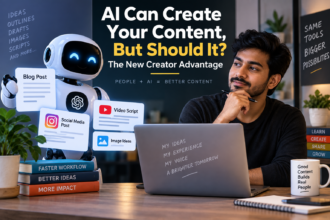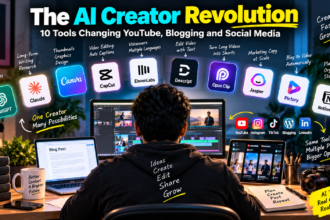
If you have opened Instagram, YouTube, or LinkedIn any time in the last year, you have probably noticed something: creators who used to post twice a week are now posting daily, and their content looks sharper, faster, and more consistent than before. The short answer for how this is happening is simple AI tools for content creators have matured to the point where they now handle research, scripting, editing, and even distribution, freeing up creators to focus on ideas and personality instead of grunt work. This shift is exactly why “AI for content creators” has become one of the most searched topics among Indian marketers, students, and small business owners in 2026.
I run a small content and consulting setup out of Chennai, and I have spent the better part of the last two years testing almost every AI tool that claims to help creators. Some were gimmicks. A few genuinely changed how I work. In this article, I want to walk you through exactly how creators are using AI right now not the theoretical version, but the practical, “this is what I do on a Tuesday morning” version.
Why 2026 Feels Different for Creators
Earlier AI tools were mostly good at one thing writing captions, or removing background noise, or generating a thumbnail. What changed in the last year is that these tools started working together. A creator can now go from a rough idea to a published, edited, SEO-optimized piece of content in a fraction of the time it took in 2023.
This isn’t about replacing creativity. It’s about removing the boring 70 percent of content work transcription, formatting, repetitive editing, basic research so creators can spend their energy on the 30 percent that actually needs a human touch: storytelling, humor, opinion, and connection with an audience.
1. Idea Generation and Research
Every creator’s biggest bottleneck is not talent, it’s the blank page. AI chat tools like ChatGPT, Claude, and Gemini have become the default brainstorming partner for a huge number of Indian creators.
Here’s a workflow I use almost every week:
- I describe my niche and audience in plain language (“I make budgeting content for college students in India”)
- I ask the AI to generate 15-20 content angles based on recent, relatable pain points
- I pick 3-4 that feel fresh, not generic
- I ask follow-up questions to add local context festivals, exam seasons, salary cycles
The key skill here isn’t using AI, it’s prompting it well. A vague prompt gives you vague ideas. A specific one, with audience and goal clearly stated, gives you something you can actually use. This is a small but important expertise gap between creators who feel AI is “useless” and those who feel it’s a superpower most of the time, it comes down to prompt quality, not tool quality.
2. Scripting and Writing
Once an idea is locked, the next step is turning it into a script or post. This is where creators lean on AI writing assistants the most, but the smart ones treat AI as a first-draft machine, not a final-answer machine.
A practical example: for a YouTube video on “5 mistakes freshers make with their first salary,” I typically ask an AI assistant to draft a structure with hooks, transitions, and a call-to-action, then I rewrite at least half of it in my own voice. The draft saves time. My voice keeps it authentic.
One honest limitation worth mentioning here: AI-written scripts can sound flat or overly polished if you use them without editing. Audiences, especially on platforms like Instagram Reels and YouTube Shorts, can sense when something feels robotic. The creators growing fastest right now are the ones using AI for structure and speed, while keeping the actual delivery unmistakably human.
3. Video and Audio Editing
This is probably the biggest visible shift. AI-powered editing tools can now:
- Automatically cut silences and filler words
- Generate subtitles in multiple Indian languages
- Suggest B-roll or stock footage based on your script
- Clean up audio without a professional mic setup
For solo creators, this alone can cut editing time by more than half. I have seen small business owners who post product demos go from spending three hours editing a single reel to under 40 minutes, simply because the repetitive parts trimming, captioning, noise removal are now automated.
It’s worth being realistic though: automated editing tools are good at mechanical tasks, but pacing, comedic timing, and emotional beats in a video still benefit from a human pass. Treat AI editing as your assistant editor, not your final one.
4. Thumbnails, Graphics, and Visual Content
AI image tools have become common in a creator’s toolkit for thumbnails, carousel posts, and quick graphic design work. Instead of hiring a designer for every single post, many creators now generate a base design with AI and then adjust colors, fonts, and branding manually to match their identity.
A quick step-by-step for a simple, effective thumbnail workflow:
- Describe the video’s core emotion or curiosity hook to the AI tool
- Generate 3-4 variations
- Pick the one with the clearest focal point
- Add your own text overlay and branding in a lightweight editor
This keeps thumbnails consistent without eating your whole afternoon.
5. Repurposing Content Across Platforms
Growth in 2026 isn’t about creating more content from scratch it’s about squeezing more value out of what you already made. AI tools have made repurposing almost effortless:
- A 10-minute YouTube video becomes five short-form clips
- A blog post becomes a LinkedIn carousel and a Twitter/X thread
- A podcast episode becomes quote graphics and a newsletter summary
This is where a lot of Indian creators, especially students and small business owners managing content alone, get the biggest return. One good piece of content, spread across five formats, reaches five different audience habits.
6. Analytics and Growth Decisions
AI is also quietly changing how creators decide what to make next. Instead of guessing, many now use AI-assisted analytics summaries to understand which topics, formats, or hooks performed best, then feed that context back into their next brainstorming session.
This creates a loop: create, analyze, learn, create again but faster than doing it manually every time.
What AI Still Can’t Do for Creators
To keep this balanced, it’s important to be honest about limits:
- AI cannot build genuine audience trust that still comes from consistency and authenticity
- AI-generated content can sometimes be generic if prompts aren’t specific
- Tools, pricing, and free-tier limits change frequently, so what’s free today may be paid tomorrow
- Over-relying on AI for everything can make content feel less personal, which audiences do notice over time
Growth isn’t guaranteed just because you use AI tools. It comes from using them to remove friction, while keeping your unique perspective front and center.
FAQ: AI Tools for Content Creators
Q1. Which AI tool should a beginner creator start with? Start with a general-purpose AI chat assistant like ChatGPT or Claude for brainstorming and scripting. It has the lowest learning curve and gives you the widest use case before you invest in specialized editing or design tools.
Q2. Are AI content tools free to use? Most major tools offer a free tier with usage limits, and paid plans unlock faster processing, higher limits, or advanced features. Pricing and features change often, so it’s worth checking the tool’s official pricing page before committing.
Q3. Will AI make my content sound robotic? It can, if you publish AI output without editing. The safest approach is to use AI for drafts and structure, then rewrite key parts in your own voice and tone.
Q4. Can AI actually help grow a small YouTube or Instagram account faster? It can speed up production and consistency, which does help growth, but it cannot replace niche clarity, audience understanding, or genuine engagement. Think of AI as an accelerator, not a growth guarantee.
Your Next Step
If you haven’t tried this yet, pick one part of your content process ideation, scripting, or editing and test an AI tool’s free tier on it this week. Don’t try to overhaul your entire workflow at once. Start small, see what actually saves you time, and build from there.