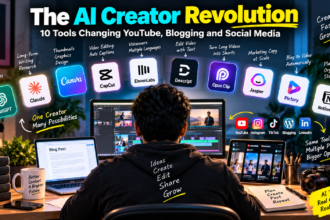
If you have ever wondered how content creators are using AI daily to write, shoot, edit, and post faster, the short answer is: at almost every single step. From brainstorming video ideas at 7 AM to writing captions right before bed, AI tools like ChatGPT, Claude, and Canva’s AI features have quietly become part of the daily routine for creators across India whether they run a YouTube channel, an Instagram page, or a niche blog.
I am Sujith, and I have been using AI tools in my own content workflow for a while now. This is not a “top 10 AI tools” listicle. It is a practical walk-through of what actually gets used, when it helps, and where it still falls short.
Why Content Creators Turned to AI in the First Place
Content creation in 2026 is relentless. A single creator today is expected to write scripts, design thumbnails, edit reels, respond to comments, and post consistently often solo or with a tiny team. That workload is exactly why AI tools found such a natural fit here.
The appeal is simple: AI does not replace the creator’s voice, but it removes the friction of starting from zero every single time. A blank page becomes a rough draft. A vague idea becomes ten headline options. A silent video becomes one with captions in under a minute.
The Daily AI Workflow of a Content Creator
Here is roughly how a typical day looks when AI tools are woven into the process.
1. Morning Brainstorming and Research
Most creators start the day by figuring out “what do I even post today.” This is where a chat-based AI tool like ChatGPT or Claude comes in handy.
A simple prompt like:
“Give me 8 content angles for [my niche] that are trending in India right now, and rank them by how easy they’d be to shoot with just a phone.”
…saves what used to be 30-40 minutes of scrolling competitor pages for inspiration. It does not give perfect answers, but it gives a starting list you can react to and refine, which is often faster than staring at a blank notes app.
2. Scriptwriting and Caption Drafting
Once an idea is picked, the next step is usually turning it into an actual script or caption. This is one of the most common daily uses of AI among creators because writing from scratch, every single day, is exhausting.
A typical approach:
- Paste in the rough idea or bullet points
- Ask the AI to write a first draft in a specific tone (“casual, like talking to a friend, no corporate language”)
- Edit and personalize the output adding local references, personal anecdotes, or humor the AI simply cannot know about
The key skill here is not “getting AI to write for you” but learning to edit AI output well. The first draft is rarely postable as-is. It is a foundation.
3. Thumbnail and Visual Ideas
Tools like Canva’s Magic Studio or dedicated AI image generators are used daily for thumbnails, carousel backgrounds, and quick graphics. A creator might type:
“Create a bold YouTube thumbnail concept idea: shocked expression, bright yellow background, text space on the right.”
The AI-generated visual rarely gets used exactly as-is, but it often sparks a direction that a human designer (or the creator themselves) can execute properly in Canva or Photoshop.
4. Video Editing Assistance
AI-assisted editing has become part of the daily grind too auto-captioning tools, AI-based background noise removal, and “remove filler words” features in editors like CapCut or Descript. These are not glamorous uses, but they save real time: what used to take an hour of manual caption placement now takes minutes.
5. Repurposing Content Across Platforms
This is where AI genuinely shines for daily use. A creator records one long-form video, then asks an AI tool to:
- Turn it into a 60-second Reels script
- Write a LinkedIn-style post summarizing the key point
- Draft 3 tweet-length versions of the main insight
One piece of content, four formats, without redoing the thinking from scratch each time.
6. Replying to Comments and DMs
Some creators use AI to draft quick, on-brand replies to common comments or DMs, especially when managing a growing audience. It is important to personalize these, since fully automated, copy-pasted replies tend to feel hollow and audiences notice.
What AI Tools Are Actually Good At
- Speeding up the first draft of anything scripts, captions, outlines
- Generating volume of ideas quickly, even if most get discarded
- Repurposing one piece of content into multiple formats
- Handling repetitive tasks like basic captioning or grammar cleanup
- Acting as a sounding board when you are stuck
Where AI Still Falls Short
Being balanced here matters, because AI is genuinely not a magic fix.
- It doesn’t know your audience like you do. AI can guess general trends but it cannot replace the specific, personal insight a creator has about their own community.
- Outputs can sound generic. Left unedited, AI-written captions often sound similar to each other, which is why the editing step matters so much.
- Facts need double-checking. AI tools can occasionally get details wrong, so anything factual — statistics, dates, claims should be verified before publishing.
- Pricing and features change. Free tiers exist for most major tools (ChatGPT, Claude, Canva), but usage limits, premium features, and pricing structures are updated periodically, so it is worth checking the official pricing page before assuming what is included.
- Over-reliance flattens originality. Creators who lean on AI for everything, including tone and personality, risk sounding less like themselves over time.
A Simple Daily AI Routine Worth Trying
If you are just starting out, here is a lightweight routine many creators follow:
- Spend 10 minutes each morning asking an AI tool for content angle ideas
- Pick one idea and draft a rough script or caption using AI as a first pass
- Rewrite at least 30 percent of it in your own voice before posting
- Use an AI captioning tool for any video content
- Repurpose the final piece into at least one extra format using AI assistance
This routine takes maybe 45 minutes total but replaces what could otherwise be a 2-3 hour content creation process.
Frequently Asked Questions
Is it okay for content creators to use AI tools daily? Yes, as long as the final output still reflects your own voice, opinions, and edits. Using AI for first drafts or repetitive tasks is common practice now; the concern is only when content is posted without any personal review or input.
Which AI tool should a beginner start with? For writing and brainstorming, ChatGPT or Claude are good starting points since both offer free tiers. For visuals, Canva’s built-in AI features are beginner-friendly since they are integrated into a tool many creators already use.
Does using AI hurt SEO or audience trust? Not inherently. What affects trust is generic, unedited, or inaccurate content not the fact that AI assisted in the process. Search engines and audiences generally respond well to content that is genuinely useful and accurate, regardless of how the first draft was created.
Are AI content tools free to use? Most major tools offer a free tier with usage limits, and paid plans for higher volume or advanced features. Since pricing and limits change periodically, it is best to check each tool’s official website for current details before relying on a specific plan.
Your Next Step
If you have not tried this yet, pick one piece of content you are planning to post this week and run it through a simple two-step test: draft it with an AI tool like ChatGPT or Claude first, then rewrite at least a third of it in your own words and tone before publishing. Compare how much time it saved versus writing the whole thing from scratch, and decide from there how much AI assistance fits your own workflow.