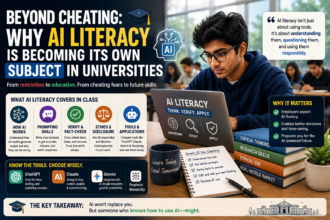
If you are a teacher wondering how to use AI in the classroom without turning your lesson plans upside down, here is the short answer: start small. Use tools like ChatGPT, Claude, or Gemini for lesson planning, quiz creation, and personalised feedback, but keep your own judgement in the driver’s seat. AI works best as a teaching assistant, not a replacement for the teacher.
I have spent the last couple of years testing AI tools daily for content and training work, and I have watched several teacher-friends in Chennai and Bangalore experiment with the same tools in real classrooms. This article puts together what actually works, what does not, and how you can start using AI in your classroom this week without any technical background.
Why Teachers Are Turning to AI Tools Now
Indian classrooms, whether in a CBSE school, a state board school, or a private tuition centre, all share the same problem: too much work, too little time. Lesson planning, correcting notebooks, preparing worksheets for different skill levels, and answering the same doubts repeatedly eat up hours that could go into actual teaching.
AI tools like ChatGPT, Claude, and Google’s Gemini are good at exactly this kind of repetitive, structured work. They will not replace a teacher’s understanding of a classroom, but they can take the first draft of almost anything off your plate.
What AI Can Actually Do for a Teacher
Here is a realistic list, based on things I have personally tried or seen teachers use successfully:
- Drafting lesson plans for a topic, adjusted for grade level and duration
- Creating multiple-choice or short-answer quizzes from a chapter or PDF
- Simplifying difficult concepts into age-appropriate language
- Generating worksheet variations for slow learners and advanced students
- Writing sample answers to compare against student submissions
- Drafting parent-teacher communication emails or report card comments
- Summarising long research papers or NCERT chapters into teaching notes
- Creating rubrics for essays, projects, or presentations
Step-by-Step: Using ChatGPT or Claude for Lesson Planning
Let me walk you through an actual workflow a teacher can use this week.
Step 1: Pick One Recurring Task First
Do not try to overhaul your entire teaching method on day one. Pick something you do every week, like preparing a worksheet, and start there.
Step 2: Write a Clear, Specific Prompt
Vague prompts give vague results. Instead of typing “make a worksheet on photosynthesis,” try something like this:
“I teach Class 8 science in a CBSE school. Create a 10-question worksheet on photosynthesis, mixing 5 multiple-choice and 5 short-answer questions. Keep the language simple for 13-year-olds and include an answer key at the end.”
Notice the details: grade, board, question type, number of questions, and reading level. The more context you give, the less editing you will need to do afterward.
Step 3: Review and Edit, Never Copy-Paste Blindly
This is the part teachers sometimes skip, and it is the most important one. AI tools can get facts wrong, especially numbers, dates, or specific curriculum details. Always read through what the tool gives you before printing or sharing it with students. Think of the AI output as a first draft from a hardworking but slightly careless assistant.
Step 4: Ask Follow-Up Questions to Refine
If the first output is not quite right, do not start over. Just reply with corrections, such as “make question 3 easier” or “add one diagram-based question.” Both ChatGPT and Claude handle these follow-up refinements well within the same conversation.
Using AI for Personalised Feedback and Grading Support
One of the most useful, and least talked about, uses of AI in Indian classrooms is helping with differentiated learning. In a class of 40 to 60 students, which is common in many schools, giving individual attention to every student is genuinely difficult.
Here is a practical use-case: a teacher can paste in a student’s essay (removing the name for privacy) and ask the AI tool to give feedback focused only on grammar, or only on argument structure, depending on what the teacher wants to emphasise that week. This does not replace the teacher’s own evaluation, but it gives students an additional layer of feedback, especially for writing-heavy subjects like English or Social Science.
For younger students, teachers have also used AI to convert a lesson into a simpler version for slow learners and a slightly harder, application-based version for faster learners, both from the same base content.
Tools Worth Trying, and What to Expect From Each
ChatGPT
ChatGPT is widely used because of its free tier and simple interface. It is strong at drafting worksheets, explaining concepts in multiple ways, and brainstorming activity ideas. The free version has usage limits and occasionally gives outdated information, so double-check facts, dates, and current events.
Claude
Claude tends to produce longer, more structured written content and is generally good at following detailed instructions, such as specific word counts or formatting requirements in a lesson plan. It also has a free tier with usage limits that reset periodically.
Google Gemini
Since many Indian schools already use Google Workspace or Google Classroom, Gemini has an advantage of integrating directly with Docs, Sheets, and Slides, which can save teachers a few extra steps when creating classroom materials.
Pricing and features across all these tools change fairly often, so it is worth checking the official pricing page of whichever tool you choose before assuming what is free and what is paid.
Limitations Every Teacher Should Know
AI tools are helpful, but they are not perfect, and being upfront about this matters more than the excitement around AI.
- Factual errors: AI can confidently state wrong facts, especially specific statistics, historical dates, or scientific figures. Always verify before using in class.
- Generic content: Without detailed prompts, AI output can feel repetitive or bland across different classes and topics.
- Data privacy: Never paste actual student names, marks, or personal details into these tools unless your school has an approved policy for it.
- Over-reliance risk: If students realise assignments are being AI-generated or graded entirely by AI, it can affect trust and engagement. Keep the teacher’s voice and judgement visible.
- Internet and device access: Not every classroom in India has reliable internet or devices, so AI-based lesson prep works best as a teacher’s personal planning tool rather than something all students are expected to access.
A Simple Weekly Routine to Get Started
If you want a low-effort way to begin, try this:
- Monday: Use AI to draft the week’s lesson plan outline for one subject
- Wednesday: Generate a quiz or worksheet from that week’s chapter
- Friday: Ask AI to help draft parent communication or report notes, if needed
Keep this routine for two or three weeks before adding anything more advanced. This gives you time to learn how the tool responds to your specific prompts and teaching style.
Frequently Asked Questions
Is it safe for teachers to use AI tools like ChatGPT or Claude in Indian schools? Generally yes, as long as you avoid entering identifiable student information such as names, roll numbers, or health details. Stick to subject content and generic classroom scenarios.
Do teachers need a paid subscription to use AI effectively? No. Free tiers of ChatGPT, Claude, and Gemini are enough for most lesson planning and worksheet creation needs. Paid plans mainly help with higher usage limits or additional features like faster response times.
Can AI replace a teacher’s own lesson planning? No. AI is best used to speed up the first draft of planning and content creation. The teacher’s understanding of the actual classroom, student needs, and curriculum context is still essential for the final material.
Will using AI tools make students less likely to think for themselves? This depends on how AI is used. If teachers use it for their own preparation, it does not affect student thinking at all. Problems can arise if students themselves lean on AI for every assignment, so it helps to set clear classroom guidelines around student use of AI tools.
Try This Next
Pick one lesson you are planning to teach this week. Open ChatGPT or Claude and use the exact prompt structure from the “Step 2” section above, filling in your grade, subject, and topic. Compare the first output you get from both tools side by side, and see which one matches your teaching style better. That one small experiment will tell you more about using AI in your classroom than reading ten articles about it.